docs
Source-driven development
The scratch org is a source-driven and disposable deployment of Salesforce code and metadata. A scratch org is fully configurable, allowing developers to emulate different Salesforce editions with different features and preferences. You can share the scratch org configuration file with other team members, so you all have the same basic org in which to do your development.
A key feature of Salesforce DX is that you can easily keep your project and scratch org in sync. So you can put away those sticky notes! You no longer have to jot down what you changed in your local file system, IDE, or editor, or what you changed in your org.
Salesforce DX tracks any change you make locally in the project and any changes you have made in your scratch org.
force:source:push
The command sfdx force:source:push pushes source to scratch org, which means that it deploys the whole your project into temporary environment.
If you will try to execute the same command right after successfull deployment, you may see the following message:

This is feature of source-driven development, Salesforce DX tracks the changes which was made in project and sync with scratch org.
force:source:push command will not deploy the whole source twice, it will push only the changes, which are different from scratch org.
If you will make changes in project and you will execute force:source:push again, you may see something like:

Salesforce DX will push and show which files were changed or created in scratch org.
force:source:pull
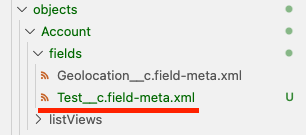
How to sync your source in scratch org with local project? Let’s have a look on example, we will create a new text field Test__c on Account object
using Scratch org and if we will execute sfdx force:source:pull it will show us the following message:

In project structure you may see the new following file:
And modificaiton on Account layout:
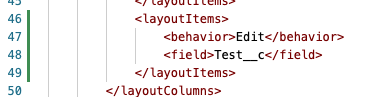
These changes are coming from Scratch org, the command sfdx force:source:pull retrieves all changes made in scratch org into our local project.
It means we retrieved metadata describing the new created field and layout where new field is placed.
The question is why we have changes also in Admin profile definition?
The answer is, that we need to grant access for all metadata in order to see them in different environments. The Admin profile in our project
is default profile for default user in a new scratch org. We need to make sure to grant access for all metadata which we create and push them into Git.